

For writers and curious people
See what Vault Max actually does.
A private library for the photos, videos, notes and documents you choose to keep apart. A useful front for the ordinary moments in between.
A separate place for selected files.
Vault Max is made by Mad Max Labs for iPhone and iPad. It keeps the collection encrypted on your device, behind its own vault credential. There is no Vault Max account or provider-hosted library. You choose the files to import and the independent backup to keep.
- Current release
- 1.1.0, released November 11, 2026
- Devices
- iPhone and iPad, iOS or iPadOS 26 or later
- Free use
- 50 counted photos, videos and documents per vault, plus one extra vault. Every security feature is included.
- Paid capacity
- Unlimited counted items within available device storage, and up to eight total vaults per device. All paid plans include the same capacity benefits.
- Working fronts
- Eleven covers, including Calculator, Clock, Weather and Desk. Use Options > Open unlock screen to reach your private library.
- Backup
- A password-protected encrypted archive that you create and keep. It is a snapshot, rather than automatic cloud sync.
Cover Notes and Desk tasks are visible before unlock and are not part of vault or device backups. Keep sensitive content inside the vault. A cover or alternate icon does not hide the app from Settings, App Library or purchase history. Optional forecasts and city search use Apple services.
More room. One payment.
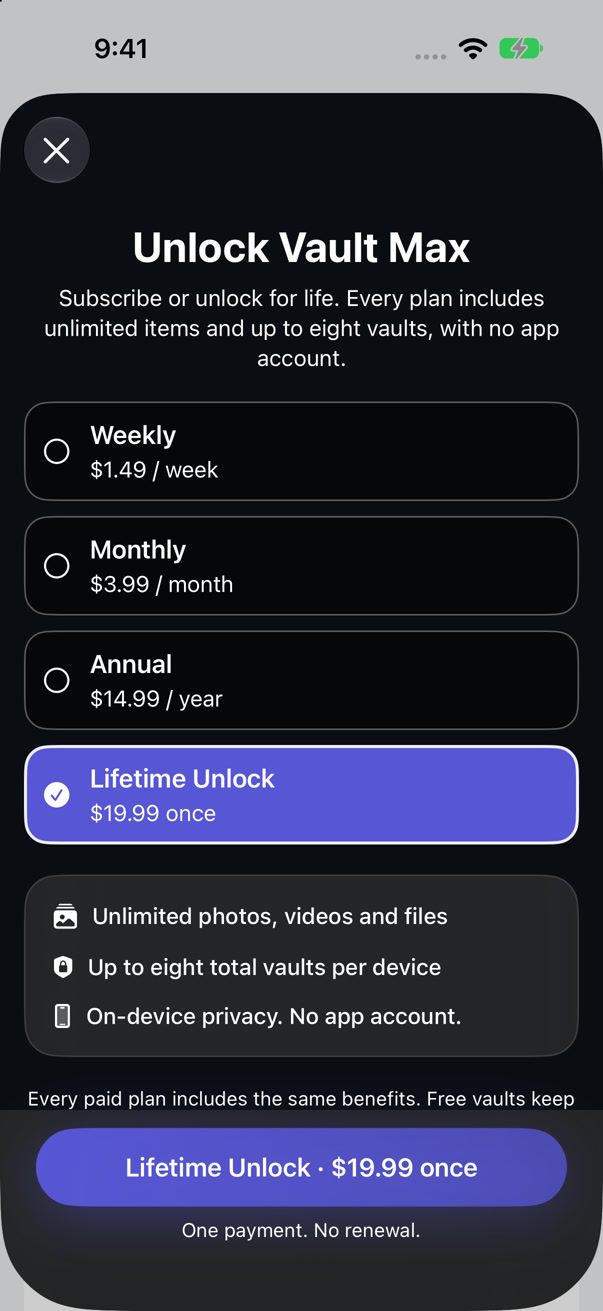
Start free. If the collection grows, Lifetime Unlock is $19.99 once in the U.S. store, with no renewal. It provides the paid capacity described above.
Subscriptions are also available: $1.49 weekly, $3.99 monthly or $14.99 annually in the U.S. Prices were checked November 12, 2026. Confirm the current regional offer in Apple’s purchase sheet.
Buying access and recovering files are separate. Restoring a purchase brings back paid access; it does not recreate a missing collection.
Compare the payment choicesWatch a small job from beginning to end.
These are genuine recordings of Vault Max 1.1 with fictional sample content. Each silent video has the same steps written beside it.
See it in the app
From a working Clock to your own photo.
- Open the Clock front and choose Options.
- Choose Open unlock screen and enter your vault code.
- Open the photo from the private library.
The clock is usable before unlock. The photo library opens after the vault code is accepted.
Download this recordingSee it in the app
A small reminder, then back to your photo.
- Add the ordinary reminder “Charge camera” to Desk.
- Mark it complete, then choose Options > Open unlock screen.
- Enter the vault code and open the sample photo.
Desk tasks are public before unlock. Keep private notes inside the vault. Desk tasks are not part of vault or device backups.
Download this recordingWatch a first photo being imported, or see the other things to try in 1.1.
A useful first test takes one ordinary photo.
- Install the app and choose a vault code you can keep safe.
- Import a harmless photo. Keep its original while you learn.
- Open it, lock the vault, then unlock and find it again.
- Try Clock or Desk and use Options to return to the photo.
- Export a copy and open that saved copy. Create an encrypted backup and keep its separate password safe before relying on important files.
With no usable backup and no vault code, we cannot recover the collection for you. The first-photo checklist gives you a plan to check the routine yourself.
The separate free browser photo inspector can help you compare saved JPEG, PNG and classic TIFF copies. It reads locally and does not inspect original HEIC files. The downloadable export study explains its samples and limits.
Real screens, ready to use.
- Download screenshots, app icon and reviewer notesZIP · Under 2 MB · Please identify Vault Max when using the assets.
- Download Clock to private photoMP4 · 32 seconds · Silent
- Download Desk to private photoMP4 · 58 seconds · Silent
- Download the first-photo importMP4 · 48 seconds · Silent
Recordings and screenshots use version 1.1.0 build 4 in iOS Simulator. They show app behavior, rather than physical-device testing, purchase completion or a backup restore. Frames are resized for the web; the app interface is unchanged.
For questions, use Vault Max support. Read the app privacy policy or about these tools and guides. Independent reviewers are welcome to test the app and publish their own findings.