
Choosing a photo vault
A few private photos shouldn’t become another monthly bill.
If you want a separate place for your photos and you’re tired of renewals, start with the free limits and the one-time price. You may not need another subscription.

You can use Vault Max without a subscription.
Start free with up to 50 photos, videos and documents per vault, plus one extra vault. If that is enough for the collection you want to keep apart, there is no reason to buy a larger plan just to get started.
For a bigger collection, Lifetime Unlock is a one-time purchase. The U.S. App Store currently lists it at $19.99. Vault Max also offers subscriptions, so choose Lifetime if avoiding a renewal is the point. See the current Vault Max listing and confirm the amount in your own storefront before paying.
We’re the makers of Vault Max. This guide explains where it fits, as well as why a different app may suit you better.
What does Lifetime actually buy?
More room for the collection you want to keep. Lifetime Unlock includes unlimited photos, videos and documents within your device’s available storage, and up to eight total vaults per device. It is one payment with no renewal. The subscription plans include the same paid capacity benefits.
You do not have to pay to get the security features. Every security feature is available in the free version. Try the 50-item limit per vault and the extra free vault before deciding whether you need more room.
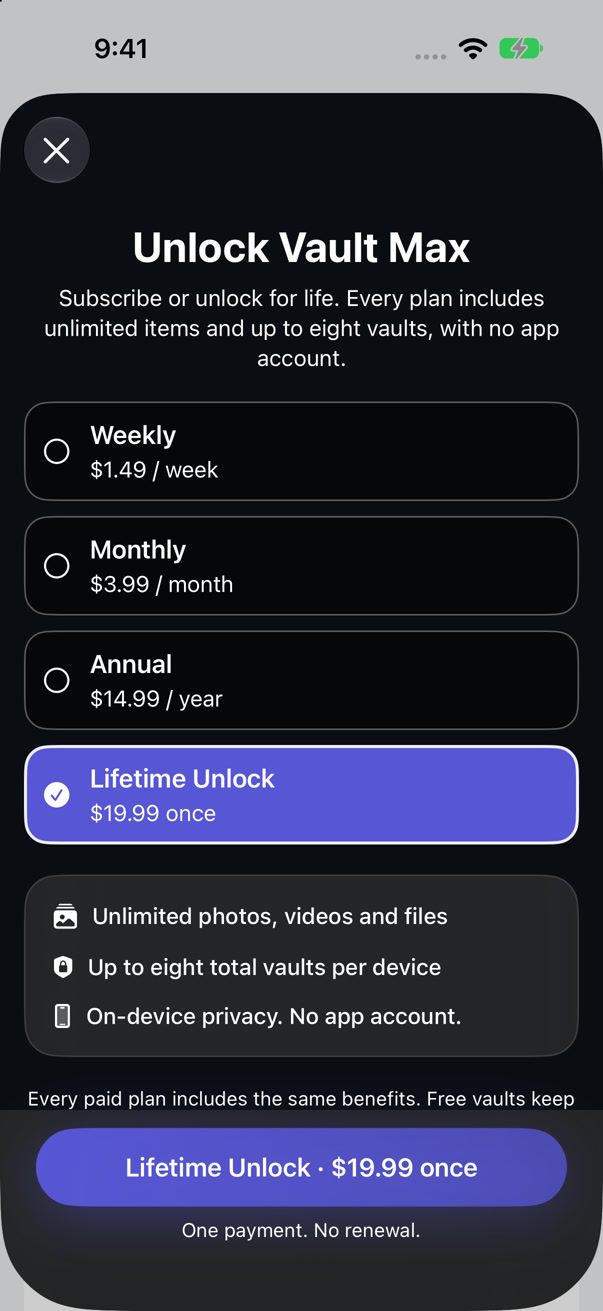
Choose the plan without a renewal.
In the app’s upgrade screen, select Lifetime Unlock. Check that the offer says once, then review Apple’s purchase confirmation before paying. This screenshot shows the selection; it does not show a completed purchase.
The price can differ by country or change later. Your own App Store purchase sheet is the final amount.
Lifetime unlocks capacity in the app. It does not add a hosted photo library, automatic cloud backup or a way for us to recover a forgotten vault code. Keep a usable encrypted backup and its separate password safe.
Look past the small monthly number.
A price that feels small today can be easy to forget. At $3.99 a month, two years costs $95.76 if you keep renewing at that rate. A $19.99 one-time purchase stays $19.99 for that purchase. Those are different payment choices; the better one depends on how long you expect to use the app.
An annual subscription may be cheaper than paying every month. Compare the plan you would actually buy, including what happens after an introductory offer. The little worksheet below is for a monthly offer versus a one-time offer.
What other vaults currently list.
These are examples from the public U.S. App Store, checked November 12, 2026. An app can list several offers at once. The purchase screen in your region is the amount that matters.
| App | Listed options | What to check |
|---|---|---|
| Keepsafe | Monthly Premium $9.99; Yearly Premium $23.99 | Whether you want its cloud storage and syncing. |
| Secret Calculator Photo Vault+ | Monthly $12.99 or $14.99; Lifetime $49.99 | It offers Lifetime too. Compare the exact offer, not just the monthly option. |
| Vault Max | Monthly $3.99; Annual $14.99; Lifetime $19.99 | Whether local storage and a backup you manage fit your needs. |
These products do not provide identical services. A lower price alone doesn’t tell you where the files live, how recovery works or whether you like using the app. We have not tested competitors’ current purchase screens or file recovery in this comparison.
Pay for the job you need done.
If you want the same private collection available across devices through a provider’s cloud, a subscription that includes storage and sync may earn its place. Check how much space it includes and how you would get the files back.
Vault Max keeps its collection encrypted on your device and does not operate a server for your files. That suits someone who wants a separate local photo library, private notes or a few personal PDFs, without a Vault Max account. It also means you need to make your own encrypted backup. A one-time purchase is not a cloud backup service.
If your whole task is keeping a handful of photos out of the main Photos view, consider Apple’s Hidden album too. You may already have all you need. Our photo-vault page explains when a separate vault code is useful.
In Vault Max 1.1, the front can be a working Clock, Weather screen, Desk or another cover, rather than always a calculator. Inside the vault, you can use a photo grid or a list for files. Read the guide to choosing a different front if the calculator look is the part you want to change.
Try one ordinary photo before paying.
- Install Vault Max and choose a vault code you can keep safe.
- Import a harmless photo, keeping its original for now.
- Open it, zoom in, lock the vault and find it again.
- Export a copy to a place you control, then open that copy.
- Make an encrypted backup and keep its separate password somewhere you can recover.
Use the first-photo checklist for a simple plan. Once the routine feels comfortable, decide whether the free space is enough or Lifetime is worth it.
Already paying for another vault? Keep the old app and its working collection until you have exported and checked what matters. Cancel the renewal separately in Settings > your name > Subscriptions; Apple explains the cancellation steps. Don’t assume cancelling a plan and deleting an app have the same result.
Keep your unlock code and backup password safe. With no usable backup and no code, we cannot recover the collection for you.
Try the free space first.
Start with something ordinary. You can decide about a larger plan after you know the app fits.

iPhone and iPad · Free to start